
 czay.dev
System Design: Scaling to a Million Users
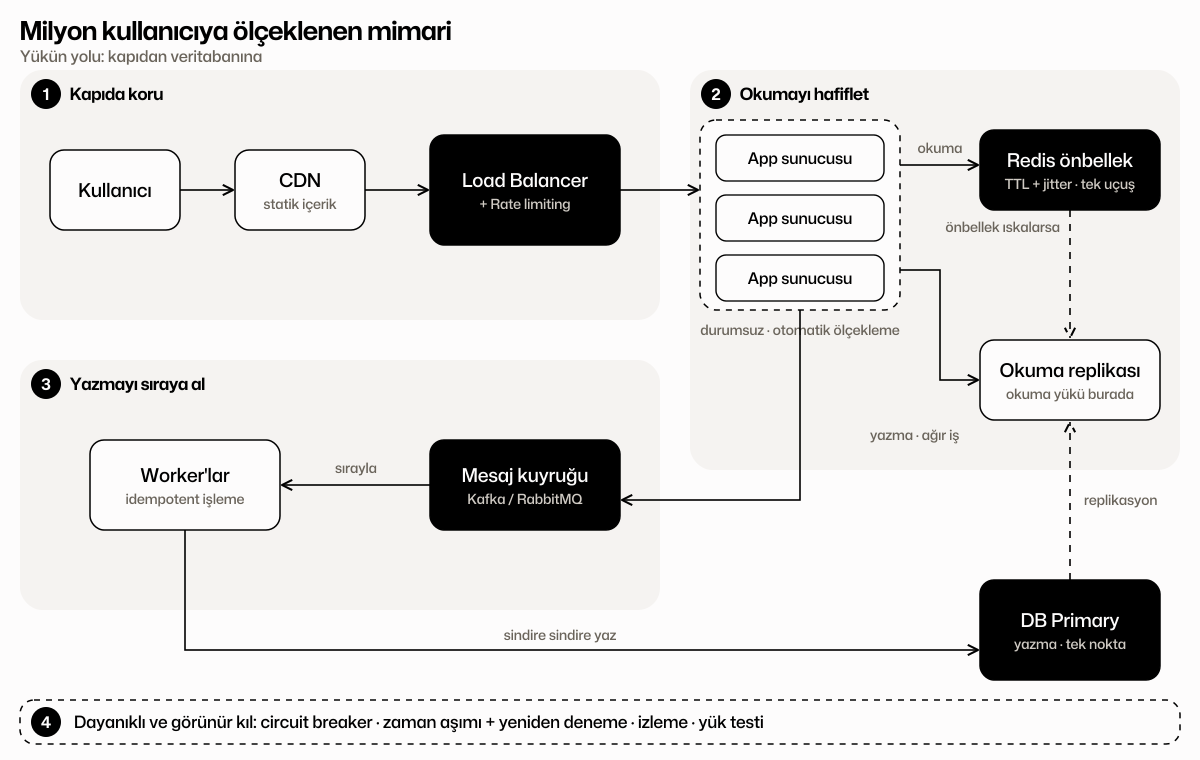
This map follows the video "They have Kubernetes and unlimited budget, yet it still falls over". Instead of memorizing one diagram, it follows the path of the load and shows which problem each layer solves.
The order is deliberate: frame the problem, protect the door, lighten reads, queue writes, then make it resilient and visible. Each step exists because the previous one wasn't enough.
- CoreKnow this well before you apply
- Nice to haveShows up a lot in job posts, gives you an edge
- LaterOnce you're on the job, when you need it
Click a topic to see what you need to know and where to learn it.
- 01
Why does it fall over?
Adding servers isn't enough: the bottleneck is always the shared part. Frame the problem first.
- 02
Protect the door
Cutting load before it reaches the database is cheaper than chasing it.
- 03
Lighten the reads
Most traffic is reads. Stop fetching the same data from the database over and over.
- 04
Queue the writes
Don't push heavy work straight into the database; queue it and digest it steadily.
- 05
Make it resilient and visible
Something will break. What matters is that everything doesn't fall together and that you can see what broke.
Topic by topic
Every topic on the map with its description, what to know and resources — in one list.
01Why does it fall over?
Two ways to scale· Core
Vertical scaling makes the machine bigger; horizontal scaling adds more of them. App servers scale horizontally; the database is usually where it jams first.
What you should know
- Vertical: easy but has a ceiling
- Horizontal: near-unlimited but needs shared state
- Keep app servers stateless
Resources
Stateless app servers· Core
Move sessions and files out of server memory so any server can replace any other.
What you should know
- Keep sessions in Redis or in signed tokens
- Write files to object storage, not local disk
Single point of failure· Nice to have
A single database every server talks to, a single component in the middle: when it falls, everything does.
What you should know
- Ask 'what happens if it dies?' of every single box
Why the database jams· Core
Connections, disk and locks are finite. When twenty servers send thousands of writes at once, the connection limit fills up and requests queue behind each other.
What you should know
- Connection pool and connection limit
- Lock contention and slow queries
- When it jams, latency multiplies suddenly
Resources
Connection pooling· Nice to have
Share a limited set of connections instead of opening one per request; protects the database from connection storms.
What you should know
- A pooler such as PgBouncer
- Servers × pool size = connections hitting the database
02Protect the door
Load balancer· Core
Spreads incoming traffic across healthy servers and removes dead ones. Without a single entry point, horizontal scaling means nothing.
What you should know
- Round-robin, least-connections and friends
- Health checks
- L4 vs L7
Resources
Health checks· Nice to have
The app reports its own health so the balancer stops sending traffic to a sick server.
What you should know
- A light /health endpoint; separate liveness from dependencies
Rate limiting· Core
Caps how many requests a client, or everyone, can make per second; excess load is rejected before it gets in so the system stays up.
What you should know
- Token bucket and fixed window
- 429 Too Many Requests + Retry-After
- Per-identity and per-IP limits
Resources
Virtual waiting room· Later
For ticket drops: queue users and let them in at a pace the system can handle.
What you should know
- Queue instead of reject
CDN and static content· Nice to have
Images, scripts and unchanging pages are served from edge locations near the user; the origin never sees them.
What you should know
- Cache-Control headers
- Briefly caching dynamic pages
Resources
03Lighten the reads
Caching (Redis)· Core
A fast in-memory layer for hot data. It removes most reads from the database, but misconfigured it creates its own problems.
What you should know
- The cache-aside pattern
- TTL and invalidation
- The cache can fail too: can the database survive that?
Resources
Cache-aside pattern· Core
Check the cache first; on a miss read the database, populate the cache, then return. The most common, simplest pattern.
What you should know
- Two steps on read; invalidate on write
Cache invalidation· Nice to have
When and how to drop the stale copy when data changes: one of the hard problems in computing.
What you should know
- Rely on TTL; delete on write for critical data
Cache stampede· Core
The moment a hot key expires, hundreds of thousands of requests miss the cache and hit the database at once. The video's main warning.
What you should know
- Add random jitter to TTLs
- Single-flight: only one request refreshes
- Serve stale while revalidating
Resources
TTL jitter· Nice to have
A small random offset on expiry so keys written together don't expire together.
What you should know
- 3600 s becomes 3600 ± 10%
Single-flight / locking· Nice to have
Only one request per key goes to the database; the others wait for it or take the stale value.
What you should know
- Distributed lock or in-process single-flight
Read replicas· Nice to have
Writes go to one primary, reads to one or more copies. Read load is spread across the replicas.
What you should know
- Replication lag
- Read from the primary when you must read your own write
Resources
04Queue the writes
Message queues· Core
Heavy work like ticket sales and orders goes into a queue first, and workers drain it at their own pace. The spike is absorbed by the queue and the database stays calm.
What you should know
- Producer, queue, consumer
- Reply 'received' right away, notify the result later
- Kafka vs RabbitMQ
Resources
Kafka or RabbitMQ?· Nice to have
RabbitMQ is for task distribution; Kafka for high-volume event streams and replay. Either is enough for your first queue.
What you should know
- Look at the job first, pick the tool second
Backpressure· Later
Slow down or reject producers when consumers can't keep up, so the queue doesn't grow forever.
What you should know
- Alert on queue length
Idempotency· Core
The same message can be processed twice from a queue; to avoid charging twice, the operation must be safe to repeat.
What you should know
- A unique key per request
- Record processed keys
Resources
Read/write separation (CQRS)· Later
Separating the write model from the read model; each scales and stores to its own needs.
What you should know
- Event-driven updates
- Its cost is complexity: only when truly needed
Resources
05Make it resilient and visible
Circuit breaker· Nice to have
Stops sending requests to a dependency that isn't responding for a while, so the rest of the system doesn't go down with it.
What you should know
- Timeouts plus retries with exponential backoff
- A fallback behavior
Resources
Autoscaling· Nice to have
Tools like Kubernetes add app servers based on load; the database can't do that automatically, which is why the earlier layers matter.
What you should know
- Scaling on CPU and request rate
- Cold-start delay when scaling
Resources
Monitoring and load testing· Core
You can't scale what you can't see. Before the big day, load the system on purpose and learn where it breaks.
What you should know
- Latency (p95/p99), error rate, saturation
- Load test in a production-like setup
Resources